




WhatsApp is one of the most famous mobile-first tools. The messenger come a long way since its early days in 2009 when it was just a simple app for sending notifications to friends. Today, 1.5 billion people use WhatsApp for everything from personal chats to business conversations.
Recently the company even launched WhatsApp Business – a separate application designed specially for small companies. Steady progress in the business communication industry makes WhatsApp a rival to other team chat apps.
Despite occasional problems with WhatsApp like the desktop app crashing on Windows, the messaging app remains widely used and popular. Its consistent updates and widespread adoption have cemented its position as a reliable choice for staying connected with a team.
Short disclaimer: Our team works passionately on Chanty, a team collaboration app. From time to time we try different team chat software and analyze their strengths and weaknesses as customers. The lessons we learn help us develop a cleaner, faster, and smarter tool.
The Chanty team is well aware of Slack. We’ve tested a fair amount of team communication apps and described our experience in a series of articles: Slack alternatives, Discord vs Slack, Ryver vs Slack, and many more in the Team Chat Wars category. We also got excited to check out how Slack is different from WhatsApp Messenger.
If you’re considering Slack vs. WhatsApp for business, it’s essential to weigh the integrations and business features that each platform offers. Whether you’re a small team or part of a larger organization, choosing the right messaging tool can significantly impact your communication effectiveness.
So, here and now I’ll share the most up-to-date WhatsApp vs Slack comparison. Let’s put down a puzzle together, shall we?
WhatsApp vs Slack features
Let’s start with the basics: Slack vs WhatsApp comparison by looking at their core features. If you’re not interested in a long, detailed description of these two messengers, I offer you the following table. It highlights all the key feature differences between Slack and WhatsApp for team communication. I’ve also included the latest information on Slack vs WhatsApp Business that you might have missed.
| Slack | WhatsApp Business | ||
|---|---|---|---|
| Pricing | Free planPro plan (starts at $8.75 user/month)Business+ plan (starts at $18 user/month) | Free | Free |
| Message history limit | 90-day searchable message history in Free plan | Unlimited | Unlimited |
| Audio/video calls | Free plan supports unlimited 1:1 audio and video calls; paid plans allow group calls with up to 50 participants. | Supports one-to-one and group audio/video calls. | One-to-one audio and video calls |
| File storage limit | Free plan: 5GB file storage for a team Pro plan: 10GB per user Business+ plan: 20GB per user | Up to the storage space of your smartphone | Up to the storage space of your smartphone |
| Money transfer | No | Yes, through WhatsApp Pay (limited countries) | No |
| Business profiles | No | No | Yes |
| Limit for conversation members | No official limit | 1024 | 1024 |
| Confirmed Accounts | No | No | Yes |
| File upload limit | 1GB | documents up to 100MB; media files up to 16MB | documents up to 100MB; media files up to 16MB |
| Integrations | Limit of 10 integrations in free plan Unlimited integrations in paid plans | No | No |
After comparing Slack and WhatsApp, you might wonder which one truly fits your team’s needs. Both bring solid communication features to the table, and if you’re after something that blends smooth messaging with task management, Chanty is another great option worth exploring. Let’s take a closer look at how each platform helps teams connect and collaborate.
WhatsApp vs Slack design
In this WhatsApp vs Slack comparison, the user interface plays a significant role, especially when choosing a tool for your team.
Usually, I don’t pay much attention to how the interface of any messenger looks on different mobile platforms. WhatsApp made me change my mind.
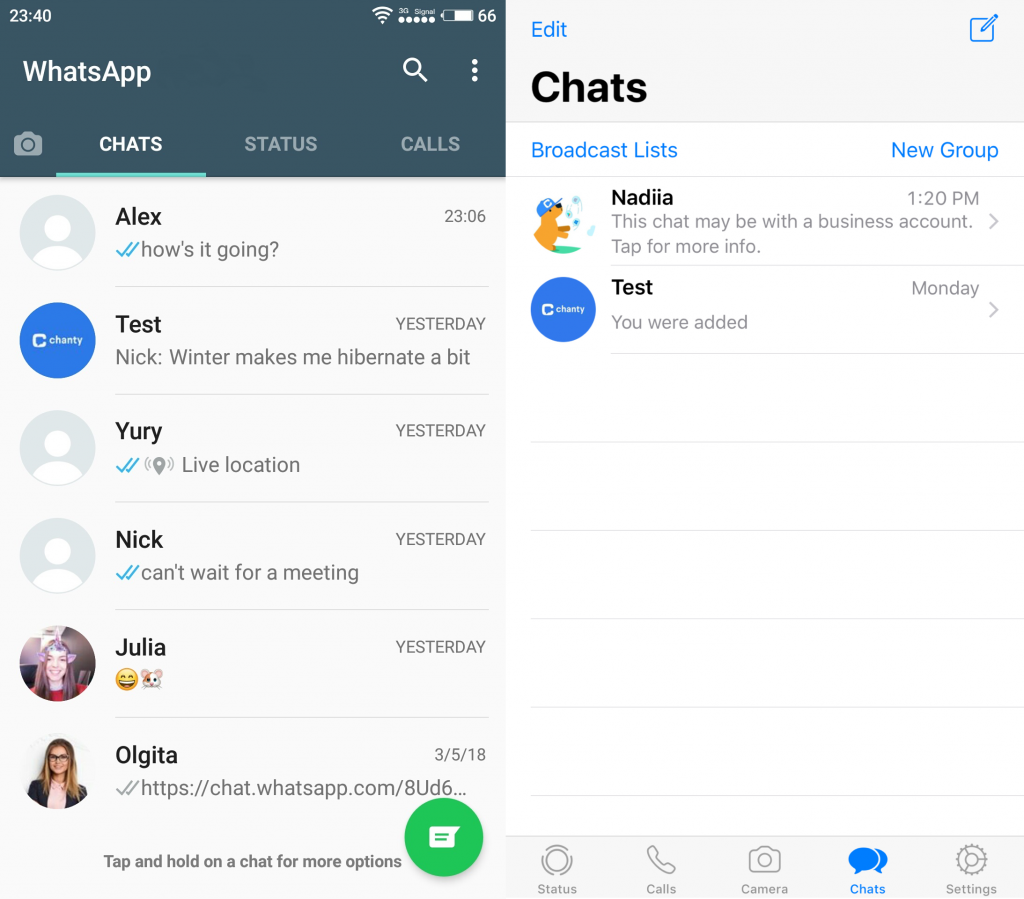
WhatsApp Messenger mobile app interface (Android and iOS)
If somebody asked me to comment on these two screenshots, I would never say that it was the same app. Colors, panels, and buttons are absolutely different. At the same time, the interface looks clean in both cases.
As for web and desktop applications, the user interface of WhatsApp and Slack has something in common. The left sidebar displays all your conversations, the right one—the history of opened dialogue. Other features are hidden behind different buttons.
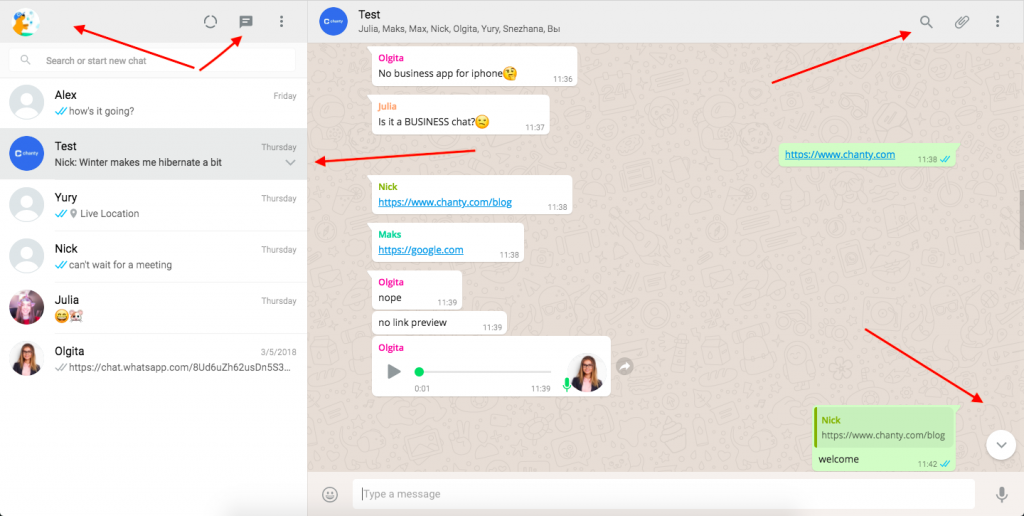
WhatsApp Web interface
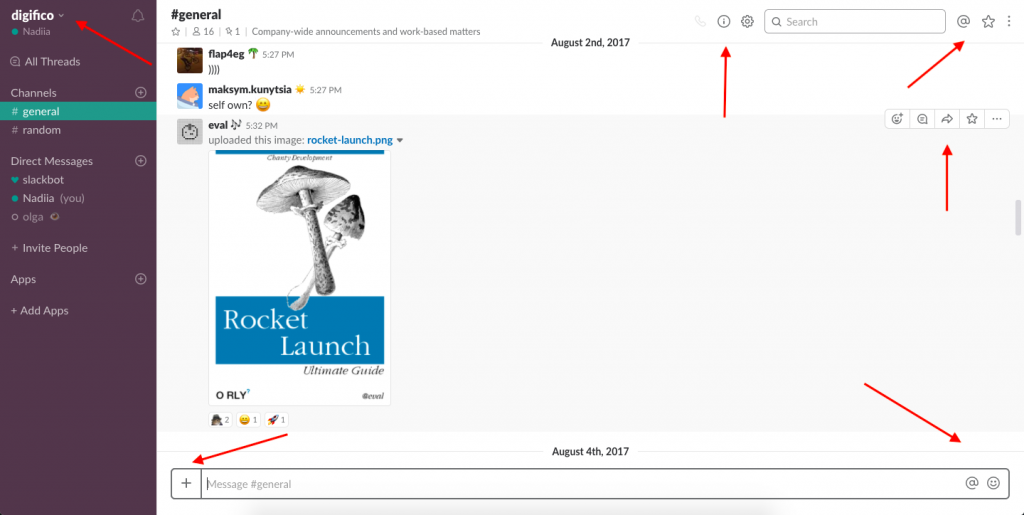
Slack Web interface
To improve user-friendliness, Slack manages its space more efficiently. First, it divides conversations into Public, Private channels, and direct messages, while WhatsApp offers only one-to-one or group chats. Second, Slack lets you customize the colors of the left sidebar greatly improving the user experience. Once you change the theme, new settings are automatically applied to your mobile application.
Chanty here takes a slightly different approach, focusing entirely on making team communication simple, clear, and intuitive. Its interface combines all essential features – chat, threads, task management, and voice/video calls – without clutter. Unlike Slack, which can sometimes feel feature-heavy, or WhatsApp, which is designed primarily for personal messaging, Chanty puts team collaboration front and center.
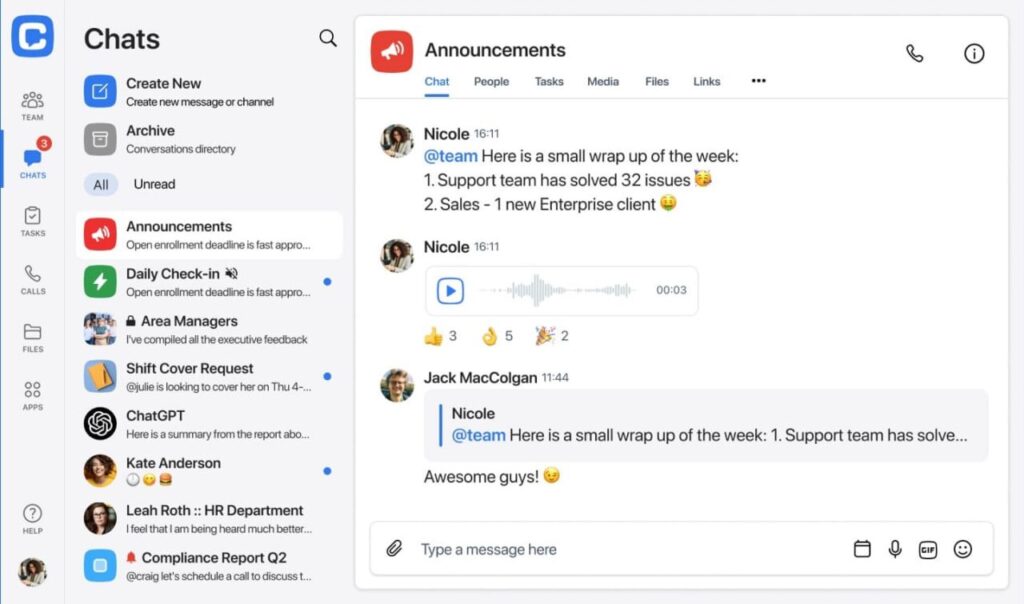
Chanty’s interface
The left sidebar keeps your conversations, threads, and teams organized, while the main workspace remains clean and distraction-free. Tasks, pinned messages, and voice/video calls are integrated in a way that feels natural, allowing teams to get work done without hunting through menus. The result is an interface that is easy to navigate for new users, efficient for regular team workflows, and visually minimalistic, providing everything a team needs in one place – nothing more, nothing less.
WhatsApp vs Slack conversations
Joining WhatsApp is easy: choose a country from the drop-down list, enter your phone number and confirm creating an account with a 6-digit code.
WhatsApp Messenger uses the data from your phone contacts and provides you with a list of people you can connect with this tool.
To verify whether a person uses WhatsApp or not, you should save a contact’s name and phone number. If they don’t have a WhatsApp account, you can ask to download this app via email or another messenger.
Text and voice messages ensure the chat feature in WhatsApp. You can reply to a message, star, or forward it. I find the last feature confusing. It would be great to have extra info about the sender of the message.

WhatsApp forward feature
Check your messages twice before sending. WhatsApp messages can be edited, but only within 15 minutes of sending. After that, you can still delete a message for everyone, but only within a limited time period. If you succeed, there will be a corresponding notification.

Delete for everyone feature in WhatsApp
In case you need a direct access to a particular dialogue, you can create a home screen shortcut. This feature is very handy with a very long list of chats.
Apart from that, you can take photos or videos right in the app, add filters, stickers, text and send them to others, share a place or your live location on Google Maps.
Slack offers a wider set of features: sharing, starring, commenting, pinning, editing, deleting, following messages and adding reactions to them. The Remind me and Mark unread buttons won’t let you forget about a particular message.
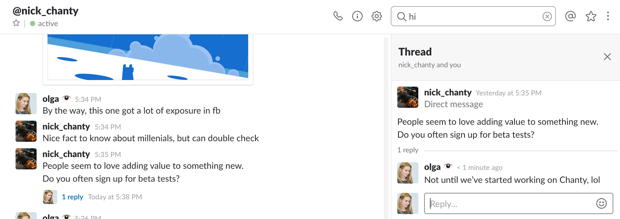
Threads feature in Slack
Urgently need to reach your colleagues in Slack group discussions? Make targeted announcements with @mentions. Threads, in turn, encourage a fully-fledged discussion tied to a specific message, link or file without distracting the general channel flow.
Chanty, on the other hand, combines WhatsApp’s simplicity with Slack’s structured communication. Sign up with email, invite your team, and start chatting without relying on phone numbers.
Chanty supports text, voice messages, reactions, file sharing, and threads. You can pin or star messages, make team announcements, and assign tasks in the built-in task manager. Multimedia and emojis are fully supported, making communication lively yet organized. Chanty offers a peaceful all-in-one alternative for teams seeking messaging, collaboration, and task management together.
WhatsApp vs Slack video calls
WhatsApp provides one-to-one audio and video calls without screen sharing. The web and desktop applications lack the audio/video calling feature. That means you can make calls from your mobile phone only.
My colleague and I had video calls on WhatsApp several times. I heard her pretty well during our conversation but ran into the overexposure problem. It might be my phone camera or some software-related issue, so mind that while using phone calls on WhatsApp.

Video call in WhatsApp
Slack’s built-in video calls become a legit alternative if you don’t want to integrate your account with other video conferencing tools like Skype, appear.in or Blue Jeans.
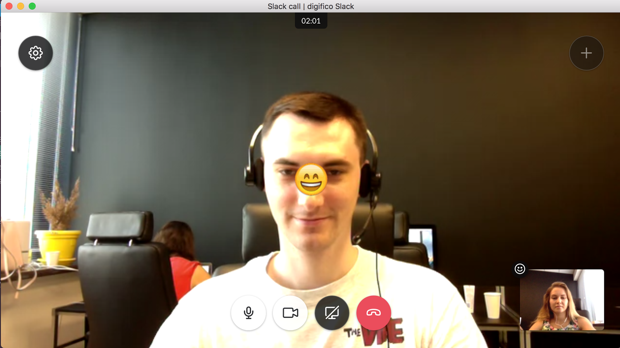
Video call in Slack
Slack allows you to call one person at a time for free. The paid plan offers a screen-sharing feature and video conferences with up to 15 people. You can also let others draw on your screen and share the mouse control.
For teams looking for a bit more flexibility and collaboration options, Chanty takes things a step further. It offers seamless video and audio calls directly from the app, supporting both one-on-one and group calls for up to 20 participants. Screen sharing comes built-in, and you can collaborate easily using remote mouse control or the whiteboard feature. All of this works across desktop and mobile, so your team can stay connected wherever they are.
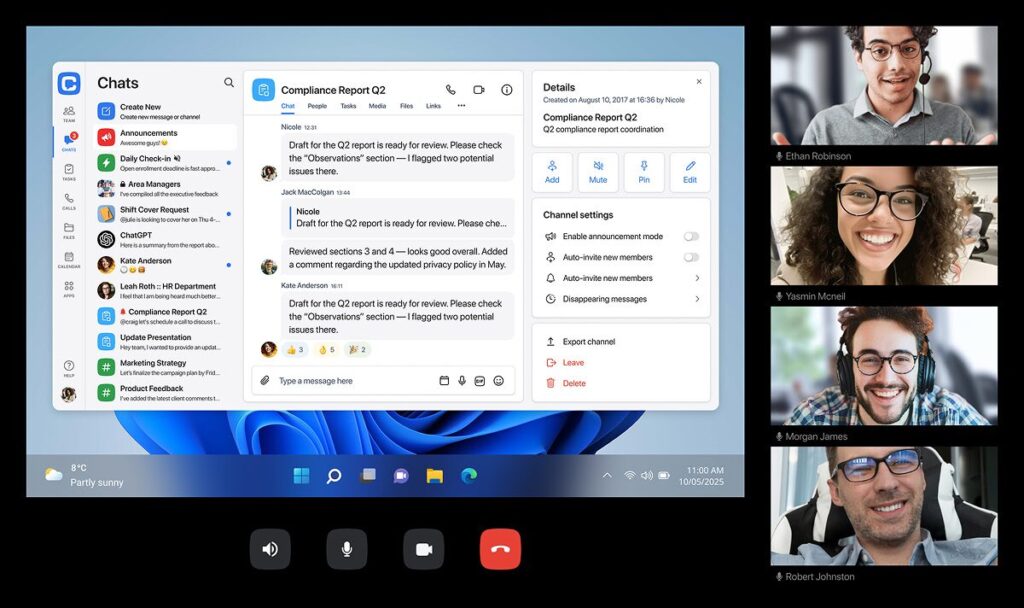
Video call in Chanty
WhatsApp vs Slack notifications
We all have some moments at work when we need maximum privacy and time to focus. In WhatsApp Messenger, you can choose different settings for notifications from a single person or a group and set a ringtone with vibration for calls. There is also a mute feature that you can turn on for a particular conversation.
WhatsApp offers iPhone users to configure notification settings during the first launch. I suppose this popup should appear only once. Nevertheless, my colleague saw it every time he opened the messenger.
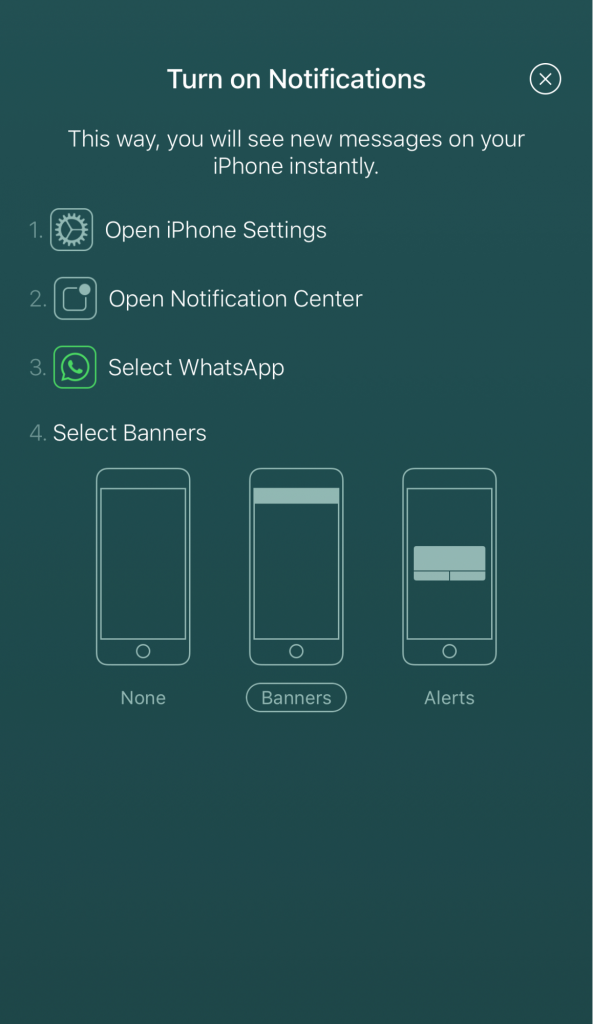
Popup notification settings in WhatsApp for iOS
In Slack, you can feel like a boss with all kinds of notifications. Keep your concentration under control with Do Not Disturb mode, channel-specific settings, keyword alerts and many more options.
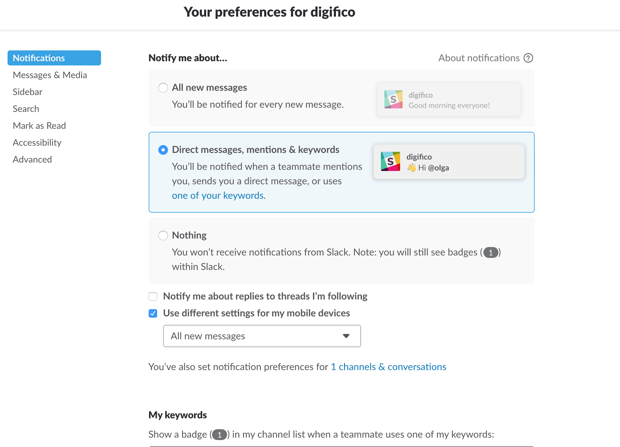
Notification preferences in Slack
You can also mute channels, ignore @mentions and set different settings for your mobile devices. Enjoy the silence or get notifications on what’s important for you.
Chanty brings a balance between simplicity and control. You can mute conversations, enable keyword alerts, or set Do Not Disturb hours across all your devices. Unlike WhatsApp, which can be a bit inconsistent, and Slack, which has a lot of options, Chanty keeps notification management clear and straightforward. This way, you get only what matters without losing focus or getting overwhelmed.
WhatsApp vs Slack search
WhatsApp delivers a very simple search tool. You just type whatever you need to find in the search field, and WhatsApp shows you all the relevant messages.
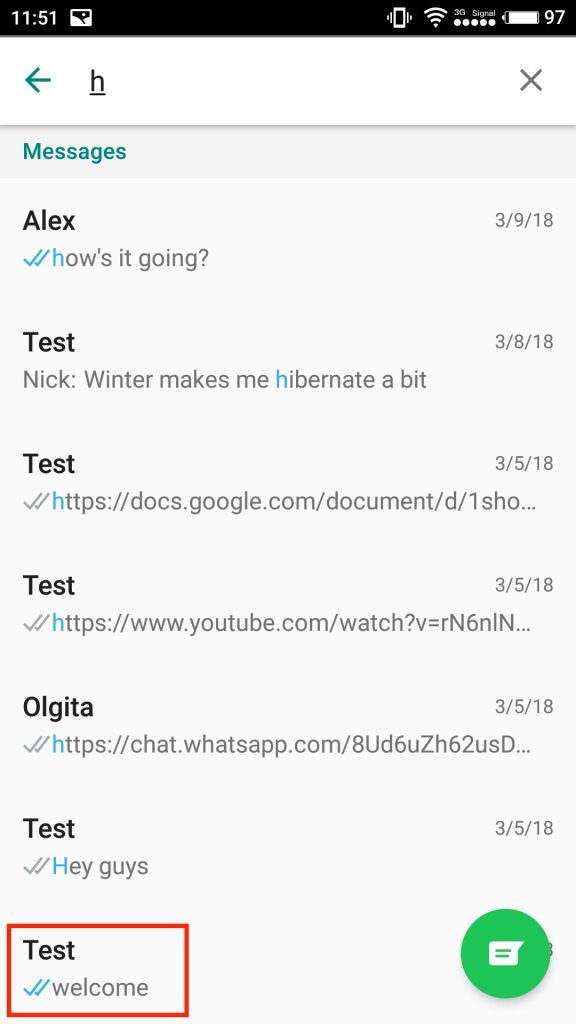
Search feature in WhatsApp
I tried to find messages with the letter h in order to test the search feature. As you can see, the results are pretty unpredictable.
Slack comes with a more advanced search. You can specify results with a particular person, channel or time period.
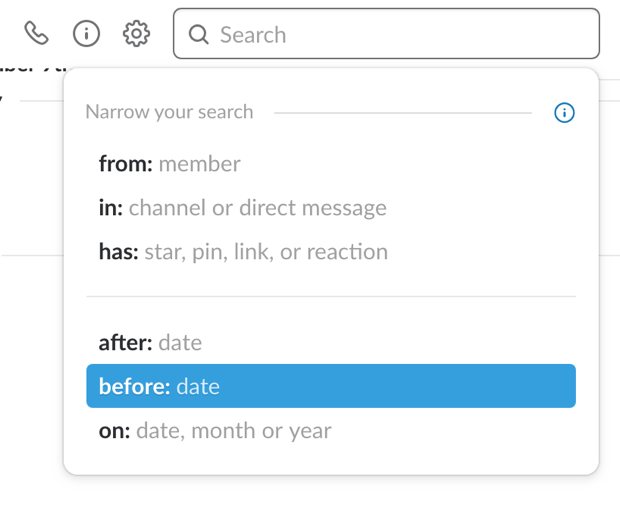
Search options in Slack

Slack search within file
What I highly appreciate is the search within documents. Office employees regularly share documents and it’s simply impossible to remember all file names. In Slack, you can recall words that the document contains for sure. And voila. Here it is.
Chanty also offers a powerful search tool directly within conversations. You can type keywords and instantly see results across messages, threads, and even within shared files. Unlike WhatsApp’s simple search, Chanty lets you filter results by user, date, or conversation, making it much easier to locate exactly what you need.
Just like Slack, Chanty allows you to search the content of documents uploaded to the platform. Whether it’s PDFs, Word documents, or spreadsheets, Chanty indexes the text inside files so you can find that one crucial line without opening dozens of attachments.
Overall, Chanty combines simplicity with advanced options, giving teams a fast and reliable way to retrieve messages and files all in one place.
WhatsApp vs Slack money transferring
While I was searching for information about these two messengers, I came across the article about the official launch of WhatsApp’s new service. Express.co.uk writes: “WhatsApp has confirmed long-rumored plans to roll-out its in-app payment system, allowing users to transfer money within the chat app.”
This feature positions WhatsApp as a strong Slack competitor, especially for those considering WhatsApp vs Slack for business.
WhatsApp payment system, which is currently available in India, has made significant strides, and in addition to peer-to-peer transfers, WhatsApp now allows users to pay bills for services like electricity, water, gas, and mobile recharges – all within the app. Here is what this option looks like.

On the other hand, Slack doesn’t have a native in-app payment system. However, if you want to send and receive money right in the messenger, the PayPal integration is at your service.
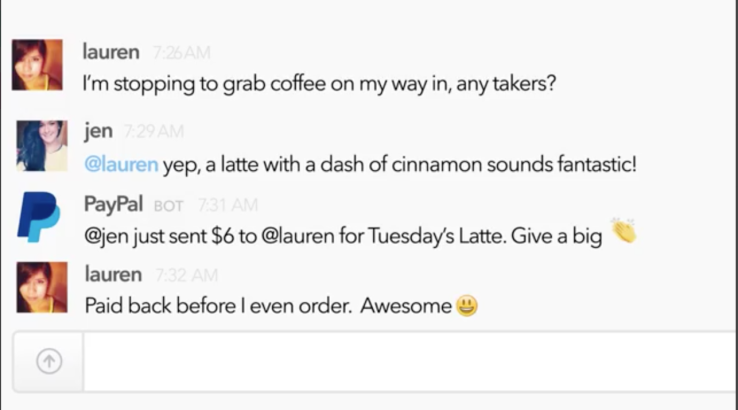
Slack also offers chatbots for tracking financial operations. You can find more information on the Slack website if necessary.
Both platforms have made a stride in regards to financial matters, but their tactics are still divergent. WhatsApp incorporating bill payment services into the application sets it on the path of becoming a full-fledged business tool. Slack, on the other hand, uses in-chat billing but requires integration with other applications, which is good for certain businesses.
To summarize, WhatsApp’s in-app payment system is a compelling feature for those considering business communication tools, especially in regions where the service is available. Slack’s third-party integrations and payment options are better for businesses that are already using its platform, but it doesn’t support peer-to-peer or bill payments natively.
WhatsApp vs Slack integrations
Need to integrate your messenger with third-party apps? It’s up to Slack for sure. You can connect your account with 2000+ different tools you use at work. This team messenger offers only 10 integrations in the Free plan. That is why you should be ready to pay if you need more.
WhatsApp Messenger doesn’t integrate with third-party apps. Are integrations a deal-breaker for you? A large amount of other team communication tools will help you out.
Here’s a middle ground: Chanty. Even on its Free plan, Chanty connects with essential apps like Google Drive, Trello, and Zapier. Paid plans expand your options further, giving your team the integrations they need without overcomplicating workflows.
WhatsApp vs Slack AI features
AI is slowly becoming part of everyday team communication, and both Slack and WhatsApp are jumping on the trend.
Slack focuses on productivity. Its AI can summarize long threads, highlight key updates, suggest follow-ups, and even draft quick replies. Some features, like generating detailed recaps or interacting with AI agents, are available on paid plans or are gradually rolling out. The idea is to help teams stay informed and save time without leaving Slack.
WhatsApp’s AI – Meta AI – is more conversational. You can mention @Meta AI to ask questions, summarize unread messages, or get quick guidance in chats. Some advanced capabilities, like generating images from text, are still limited to select regions or users, and availability on WhatsApp Web is gradual.
The key difference is purpose: Slack’s AI is designed to boost efficiency, helping teams manage work faster, while WhatsApp’s AI focuses on smoother, smarter conversations. Both tools show how AI can make communication easier, but keep in mind that some features are still rolling out and may not be available to every user yet.
WhatsApp Business
While this article mainly compares WhatsApp Messenger and Slack, I couldn’t resist testing out the latest features of WhatsApp Business. Available for free on Android (though still no word on an iOS release), WhatsApp Business is tailored for business communication, offering several useful tools that distinguish it from the regular WhatsApp Messenger.
WhatsApp Business follows the same design as WhatsApp Messenger but adds a few business-friendly features. You can set up a business profile with details like a description, category, address (linked to Google Maps), business hours, email, and website – all things that make it easier for customers to find the info they need.
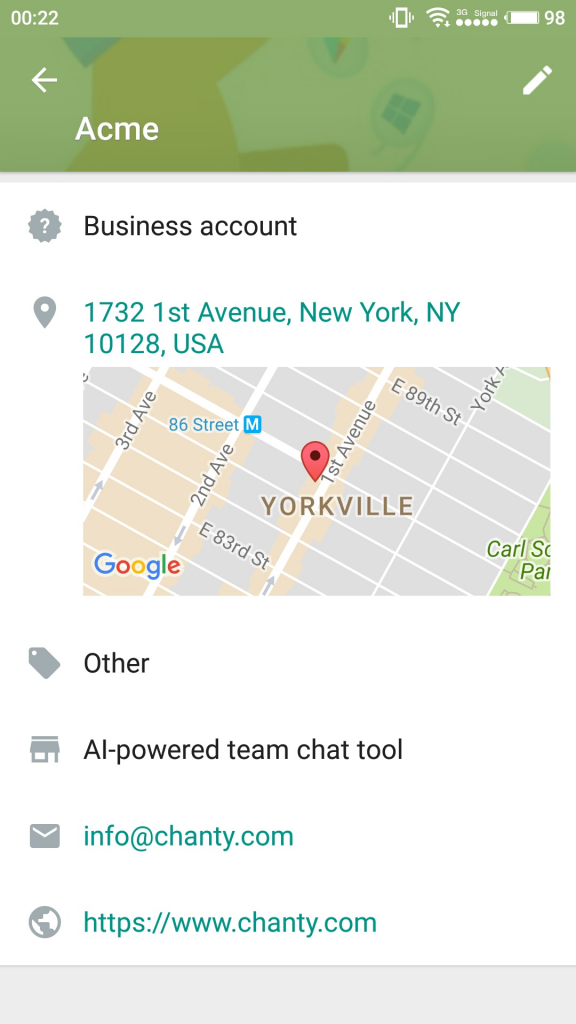
WhatsApp Business profile
WhatsApp Business also includes features like Quick replies, Greeting and Away messages to help people speed up the response time. The “Labels” feature helpyou organize contacts and messages into custom groups, making it easier to manage different types of inquiries or clients.
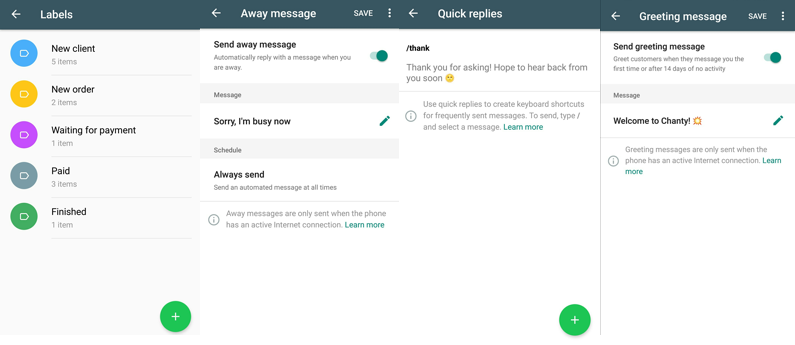
WhatsApp Business Messaging Tools
Another significant plus is the web app for WhatsApp Business. You can use WhatsApp Business on your desktop by scanning a QR code from your phone, which is a nice addition even if it’s not as smooth as Slack’s desktop apps.
WhatsApp Business is a solid option for business communication, but there’s still room for improvement. It could use more platform support and better integration with other tools. While it works well, it doesn’t quite stack up to Slack’s all-in-one collaboration features.
WhatsApp vs Slack security
When comparing the security of WhatsApp and Slack, both platforms have their strengths and weaknesses.
WhatsApp messages are encrypted, so only you and the person you’re chatting with can read them. That’s a big plus! However, there are some concerns, especially about unencrypted chat backups. If someone hacks your cloud account, your backups could be at risk. There are also concerns about group chats being vulnerable to online exposure. So don’t forget to turn on two-factor authentication to protect against phishing. Speaking about regulatory rules, especially the Health Insurance Portability and Accountability Act, the answer is: WhatsApp is not HIPAA-compliant.
On the other hand, Slack offers solid security features, like data encryption and compliance certifications. However, it uses third-party apps that can create security gaps. Businesses must carefully vet the apps they use with Slack to avoid risks. Access management is also important to keep information safe.
When choosing between WhatsApp and Slack for business communication, security is a key factor. WhatsApp has strong encryption, but users must back up their data and be careful of phishing. Slack has strong security, but there are risks with how it is used. Both platforms have good and bad points. Users should think about what they need and how they communicate to choose the right one.
Chanty adds another option for secure team communication. Like Slack, it encrypts messages and files and gives admins control over access. Unlike WhatsApp or Slack, Chanty combines messaging with built-in task management, which reduces the need for multiple third-party apps and lowers potential security risks. For teams looking for secure communication and organized workflows in one place, Chanty is a strong alternative.
WhatsApp vs Slack bottom line
WhatsApp is a great tool for personal communication. It helps people stay in touch with friends and family, share photos, and send voice messages. But when it comes to Slack vs WhatsApp for business, WhatsApp lacks some essential features for workplace communication. There’s no detailed search, video calls are limited to just two participants, and integrations are very basic. While it’s convenient, WhatsApp is ultimately better suited for informal communication rather than professional team collaboration.
Slack, on the other hand, is built for businesses. It organizes office conversations, supports group video calls, and connects the apps teams use every day. So, why is Slack better than WhatsApp? Simply put, it provides a more professional workspace with structured communication, searchable message history, and integrations that help teams stay productive. That said, its Free plan has limits (only 10 integrations, 5GB of storage, and access to the last 90 days of messages) which is why some teams look for alternatives that combine features and affordability.
This is where Chanty comes in. It’s a simple team chat that offers both powerful communication tools and fair pricing. With a built-in task manager, high-quality audio and video calls, voice messages, third-party app integrations, and unlimited message history across all plans, Chanty helps teams stay organized and work smarter.
Schedule your demo call with the Chanty team.
FAQ
Can I use WhatsApp for team communication at work?
You can, and plenty of small teams do. It’s fast, familiar, and everyone already knows how to use it. The downside is that conversations can become difficult to organize as your team grows, especially when multiple projects are happening at the same time.
Why do businesses choose Slack instead of WhatsApp?
Mostly because Slack keeps work conversations organized. Channels, threads, integrations, and searchable message history make it easier to find information and manage communication without everything ending up in one chat feed.
Is WhatsApp Business a good alternative to Slack?
For customer communication, it can be. For internal team collaboration, not usually. WhatsApp Business adds useful business features, but it still isn’t designed around project discussions, workflows, and team collaboration in the same way Slack is.
Does Slack feel too complicated compared to WhatsApp?
At first, it can. WhatsApp is incredibly simple because most people already use it every day. Slack takes a little longer to learn, but many teams find the extra organization worth the effort.
Which platform is better for remote teams?
If your team mostly needs quick conversations, WhatsApp can work surprisingly well. For teams managing projects, sharing files, and collaborating across departments, Slack usually provides a much better structure.
Is Slack more secure than WhatsApp?
They focus on security differently. WhatsApp is known for its end-to-end encryption, while Slack offers more business-focused security features, administrative controls, and compliance options that larger organizations often require.
Can WhatsApp replace Slack for a small business?
For some very small businesses, yes. If communication is straightforward and you don’t rely on integrations or project workflows, WhatsApp may be enough. As teams grow, many eventually look for tools with more structure.
What is the biggest advantage of Slack over WhatsApp?
For me, it’s organization. Being able to separate conversations into channels and easily search past discussions saves a lot of time compared to scrolling through chat histories.
Is there a tool that combines the simplicity of WhatsApp with the structure of Slack?
Some teams look for exactly that balance. Tools like Chanty aim to provide familiar team messaging while also including features like task management, channels, and team collaboration tools in one place.
Which should I choose: WhatsApp, Slack, or an alternative?
If you need simple messaging and already use it daily, WhatsApp is hard to beat. If your team needs organized collaboration and business integrations, Slack is usually the stronger choice. If you’re looking for something in between, a platform like Chanty may be worth considering.
DiscoverSlack:🔍 Review 💰 Pricing 🧑💼 Slack for Business ⚖️ Competitors 🔄 Alternatives 🛠 Self Hosted Slack Alternatives |







Add comment